DOCUMENTATION / GETTING STARTED
Build and manage Zoom Marketplace apps from your coding client.
App builder for agents is an OAuth-powered MCP service for Codex, Claude Code, and other compatible AI coding
clients. It helps authorized Zoom account administrators inspect and manage Marketplace app configurations.
PLUGIN + MCP QUICKSTART
Sideload the Zoom plugin, then connect App builder for agents.
The Zoom plugin supplies product knowledge and app-building workflows. App builder for agents supplies the
authenticated tools that read, create, validate, update, and delete apps in the authorized Zoom account.
Use the repository built for your coding client; the two packages are not interchangeable.
Prerequisites
- A Zoom account with permission to create and manage Marketplace apps
- Zoom for Developers view and edit permissions where required by the account
- Git and either Codex CLI or Claude Code installed
- A browser available to complete Zoom authorization
- Permission to sideload a local plugin and configure an MCP server
No paid Zoom plan is required for the basic General App workflow. Individual Zoom products and app features
may require additional licenses or account permissions.
-
Clone the Codex plugin locally.
git clone https://github.com/zoom/zoom-plugin-codex.git \
  "$HOME/zoom-plugin-codex"
-
Register the cloned directory as a local marketplace.
codex plugin marketplace add \
  "$HOME/zoom-plugin-codex"
-
Install the locally sideloaded Zoom plugin.
codex plugin add zoom@zoom-local
-
Add App builder for agents as a remote MCP server.
codex mcp add zoom-marketplace-helper \
  --url https://marketplacehelper.asdc.cc/mcp \
  --oauth-resource https://marketplacehelper.asdc.cc/mcp
-
Start OAuth and request the helper scopes.
codex mcp login zoom-marketplace-helper \
  --scopes marketplace:read,marketplace:write,offline_access
This is a local sideload. Start a new Codex session after installation so plugin skills and commands reload.
-
Clone the Claude plugin locally for sideloading.
git clone https://github.com/zoom/zoom-plugin.git \
  "$HOME/zoom-plugin"
-
Add App builder for agents to Claude Code.
claude mcp add --transport http --scope user \
  zoom-marketplace-helper \
  https://marketplacehelper.asdc.cc/mcp
-
Sideload the plugin when launching Claude Code.
claude --plugin-dir "$HOME/zoom-plugin"
-
Approve the MCP connection and complete OAuth when Claude prompts.
Use /mcp inside Claude Code if the authorization prompt does not open automatically.
This loads the plugin for that Claude session only. Repeat --plugin-dir when starting another session.
Before installing
These instructions intentionally use local sideloading rather than a published plugin catalog. Review each
repository and its permissions, and run the commands only in an environment where you trust the source.
What happens during OAuth
- 01
Your coding client contacts App builder for agents.Codex or Claude connects to Loading service URL… and reads its OAuth discovery metadata.
- 02
App builder for agents starts authorization.The service opens its authorization route and securely tracks the client callback, PKCE challenge, requested scopes, and state.
- 03
Your browser is redirected to Zoom.Zoom authorization uses the registered production callback shown below.
- 04
Zoom returns to App builder for agents.The service exchanges Zoom's code server-side, encrypts the Zoom token set, and redirects an MCP authorization code to the temporary loopback callback opened by Codex or Claude.
- 05
The MCP tools become available.The plugin's skill selects the app model and manifest while App builder for agents performs the authorized Marketplace operations.
https://zoom.us/oauth/authorize?response_type=code&client_id=ppZXdcR5Q1aih7ZViaGQdQ&redirect_uri=https://marketplacehelper.asdc.cc/oauth/callback
Do not configure the Zoom callback above as the coding client's MCP callback. App builder for agents owns that
callback; Codex and Claude use their temporary localhost callback automatically.
Try your first request
Start with a clear app goal and ask the plugin to gather any missing settings before making changes:
I want to create a Zoom Marketplace app for a Team Chat integration. Ask me for any required choices, build and
validate the manifest, then create the app and return its app ID.
Use the Marketplace tools
List and inspect apps
Ask the agent to list the Marketplace apps accessible to the account, then provide an app ID to retrieve its
metadata or export its manifest. Unpublished developer drafts may be absent from list results, so use the exact
app ID returned when the draft was created.
Create an app
Ask the agent to create a General App or Server-to-Server OAuth app and provide its intended authorization
level, Zoom products, HTTPS URLs, scopes, and features. General App manifests are validated before creation.
Meeting SDK is configured as a capability of a General App rather than as a standalone app type.
Update an app
- Export the current manifest using the exact app ID.
- Change only the intended settings.
- Validate the complete replacement manifest with the app ID.
- Apply the update and export the manifest again to verify the result.
Manifest updates replace the complete configuration, so exporting first prevents unrelated fields from being omitted.
Delete an app
Provide the exact app ID and explicitly confirm deletion. The helper deletes the app and verifies that Zoom no
longer returns it. Deleting an app is permanent and is separate from removing App builder for agents from the
Zoom account.
Connection reference
The remote MCP endpoint and OAuth discovery documents are:
Loading service URL…Loading protected-resource metadata URL…Loading authorization-server metadata URL…
Authorization
The MCP client starts an OAuth authorization flow. You authorize the Zoom account in the browser, and the
helper stores the Zoom token in an encrypted local SQLite database. The raw Zoom access token is not returned
in the browser callback.
The helper MCP scopes are:
marketplace:read for read-only Marketplace operationsmarketplace:write for create, update, and delete operationsoffline_access for refresh-token support
Available tools
- List apps exposed by Zoom's account-level Marketplace endpoint; unpublished developer drafts may be absent
- Create General and Server-to-Server OAuth apps
- Configure Meeting SDK as a capability of a General App
- Read app metadata and export normalized manifests for app types supported by Zoom's manifest API
- Validate and replace complete General App manifests
- Delete apps by exact app ID
Important workflows
Validate a General App manifest before creating or replacing it. Export the current manifest before updating
so fields that should remain unchanged are preserved.
Marketplace list results may not include unpublished developer drafts. Keep the exact app_id
returned by creation for later reads, updates, or deletion.
Remove App builder for agents
To revoke the integration from your Zoom account:
- Sign in to the Zoom App Marketplace.
- In the upper-right corner, select Manage.
- In the left navigation, select Added Apps.
- Find and select App builder for agents.
- Select Remove, optionally provide a reason, and confirm removal.
Removal revokes the integration's access to your Zoom account, so existing Codex and Claude MCP sessions can
no longer perform Marketplace operations. Marketplace apps previously created or updated through the helper
remain in your Zoom account and are not deleted automatically.
After Zoom confirms removal, the service deletes and no longer retains the matching installation record,
encrypted Zoom access and refresh tokens, helper MCP access and refresh tokens, and pending authorization
codes. Once cleanup completes, the service has no active credentials for the removed connection and can no
longer access the Zoom account. These records are not kept for analytics, advertising, profiling, or future
reuse, and Marketplace API responses are not retained in a separate content or analytics database.
Optionally remove the now-unusable MCP server registration from your coding client:
# Codex
codex mcp remove zoom-marketplace-helper

# Claude Code
claude mcp remove --scope user zoom-marketplace-helper
Removing the MCP registration or sideloaded plugin alone does not revoke Zoom authorization. Complete the
Zoom App Marketplace removal steps above to disconnect the account and trigger server-side cleanup.
Troubleshooting
OAuth does not open
Run the MCP login command again. In Claude Code, use /mcp and select the server to begin authorization.
Authorization is rejected
Confirm that the Zoom user can manage Marketplace apps and that the requested permissions were approved.
MCP tools are missing
Restart the coding client after sideloading, then confirm that zoom-marketplace-helper is in its MCP server list.
A draft is absent from list results
Use the exact app ID returned during creation; Zoom may omit developer-owned unpublished drafts from list results.
Manifest validation returns ok:false
Correct the referenced field-level errors and validate again. An HTTP success response does not mean the manifest is valid.
The connection stopped after removal
Add the MCP server again and complete Zoom OAuth to establish a new authorized connection.
Data protection
The service stores OAuth access and refresh tokens, account identifiers, granted scopes, and limited integration
metadata in a private SQLite database on the application host. The application state is encrypted with AES-256-GCM,
the database file is restricted to the service account, and the underlying storage is encrypted. Raw Zoom
OAuth tokens are not returned to MCP clients, browsers, or application logs.
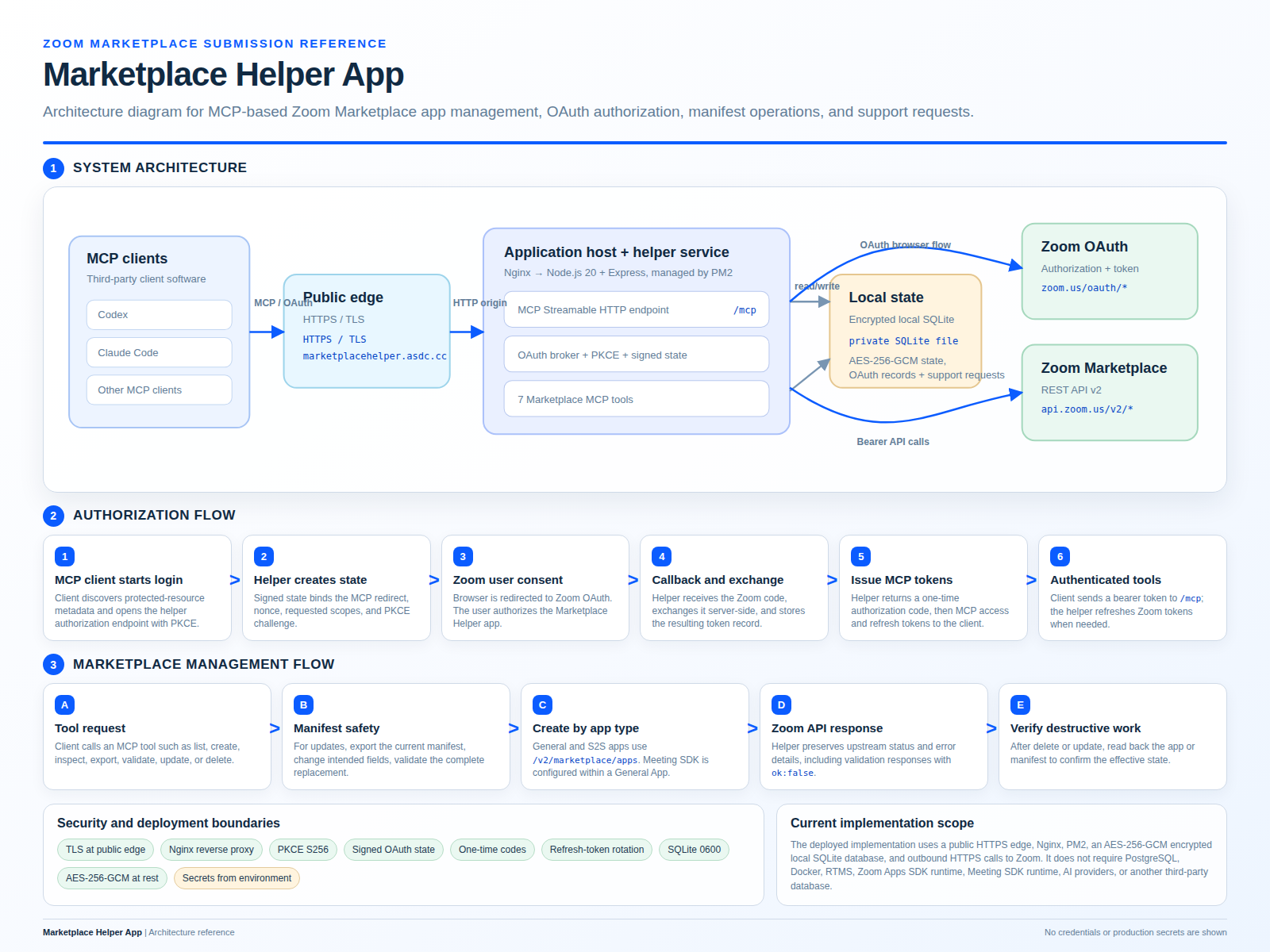
Architecture diagram
These files describe the deployed service architecture, OAuth sequence, Marketplace management flow, and
current security and storage boundaries.
Application icons
Marketplace-ready 512x512 PNG icons. Each file is larger than 160x160 and below the 1 MB limit.
Cover image
Marketplace-ready text-light PNG cover image at the required 1824x176 resolution and below 2 MB.
Download the cover image
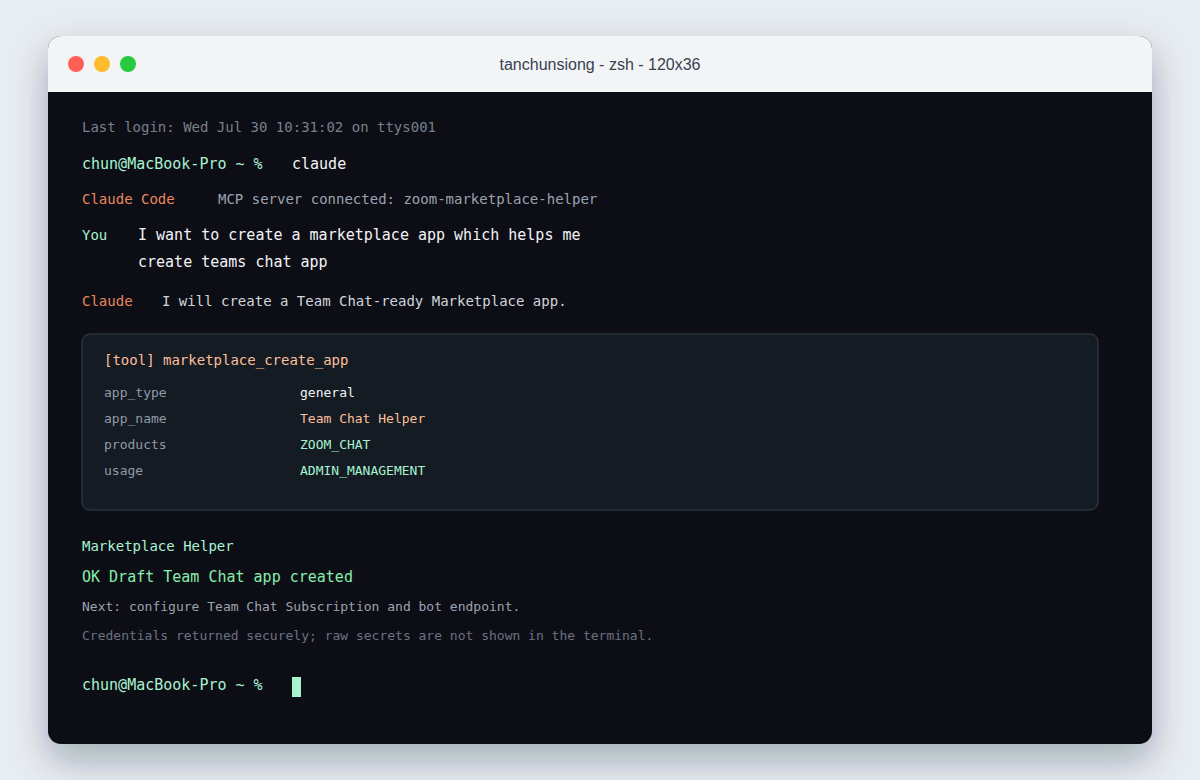
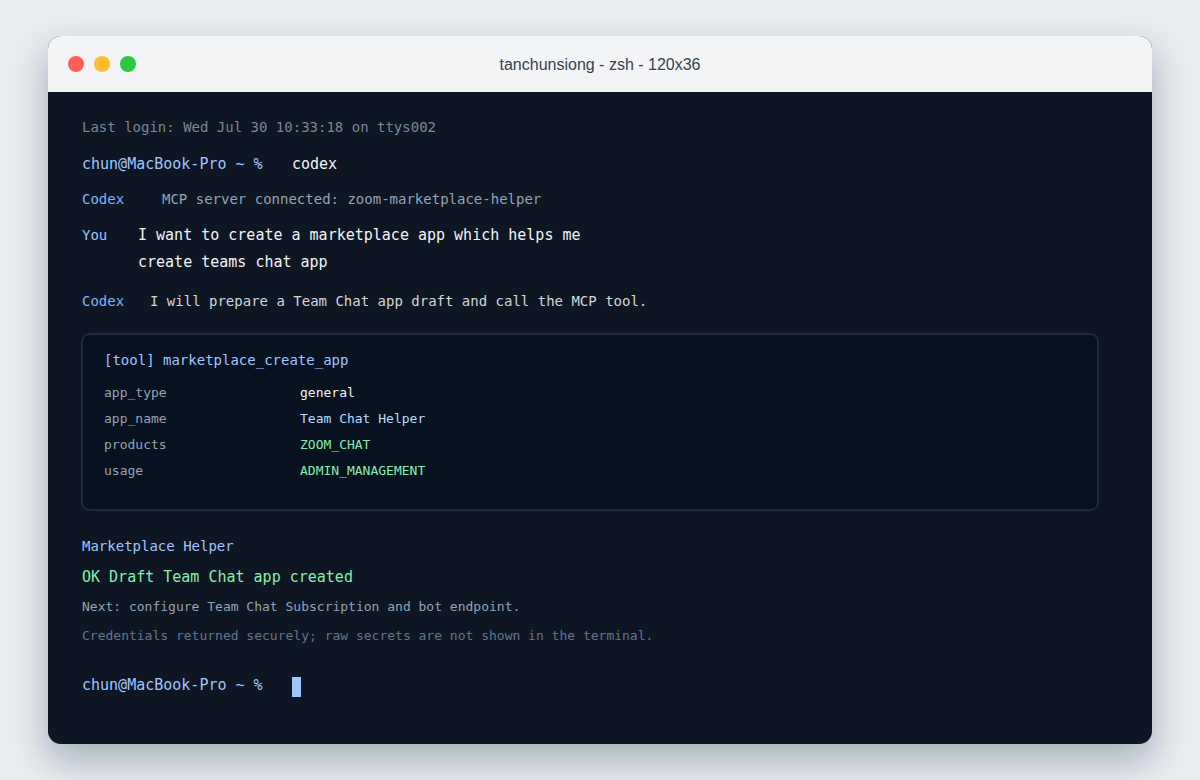
App gallery screenshots
Example CLI workflows showing Claude Code and Codex using the App builder for agents MCP service to create a Team Chat app.
Support
For installation, authorization, removal, or Marketplace configuration help, submit the
support request form. Do not include OAuth tokens, client secrets, signing secrets, or
other credentials in a request.
Open support form ↗